Automated Wrinkle Removal for Apparel Brand Catalogs
How do you remove wrinkles from clothing product photos?
Upload wrinkled garment photos to an AI clothes wrinkle remover. The AI detects fabric creases, reconstructs weave and texture underneath, and outputs smooth catalog-ready images in seconds—without blurring prints, stitching, or logos.
- Upload your wrinkled clothing product photo
- AI automatically detects and smooths fabric wrinkles
- Download the catalog-ready image with intact fabric texture
Wrinkles kill conversions. Packing lines, shipping creases, and storage folds make even premium garments look cheap in product photos. Instead of re-shooting or manually retouching every image, use AI Clothes Wrinkle Remover to automatically smooth fabric while keeping stitching, prints, and weave perfectly sharp — at catalog scale, in seconds.
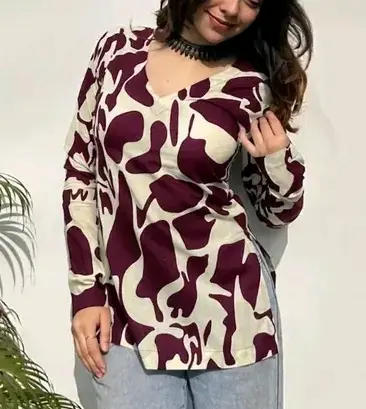
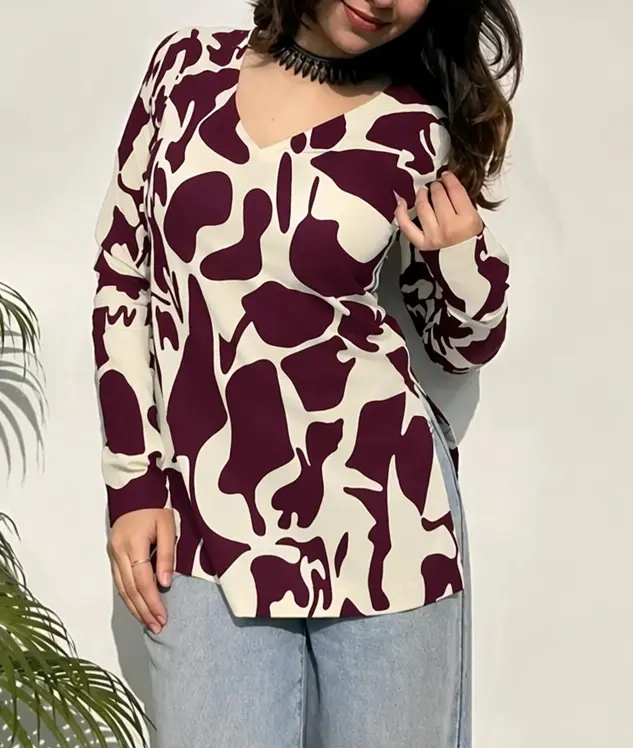
Left (Before): wrinkled garment. Right (After): AI-smoothed fabric by SnapMyDesign.
Why Wrinkles Matter in Product Photography
Studies show that product image quality directly impacts click-through rates and return rates. For apparel specifically:
- Creases signal poor quality — shoppers associate wrinkles with cheap or used items
- Packing lines from shipping are unavoidable but look unprofessional in listings
- Storage folds appear even on brand-new inventory
- Manual retouching takes 10–30 minutes per image — impossible at catalog scale
Automated wrinkle removal solves this at the source: upload a wrinkled photo, download a smooth catalog image.
How AI Fabric Wrinkle Removal Works
Unlike basic photo filters that blur the entire image, fashion-specific AI wrinkle removers:
- Detect fabric regions — identify where wrinkles, creases, and folds occur
- Reconstruct texture — rebuild the weave, stitching, and print underneath the wrinkle
- Preserve edges — keep collars, hems, buttons, and logos sharp
- Output catalog-ready files — same resolution and colour accuracy as the input
The result looks ironed — not airbrushed.
When to Use Automated Wrinkle Removal
| Scenario | Why AI Helps |
|---|---|
| Flat lay shoots | Garments laid flat often show fold lines from storage |
| Dummy / mannequin shoots | Fabric drapes create natural creases that distract buyers |
| Supplier photos | Wholesaler images arrive wrinkled from packaging |
| Reseller catalogs | Meesho and Amazon resellers can't re-shoot every SKU |
| Seasonal restocks | Stored inventory develops creases between seasons |
Step-by-Step: Remove Wrinkles from Clothing Photos
- Upload your garment photo to AI Clothes Wrinkle Remover
- AI processes the image — detecting and smoothing fabric wrinkles automatically
- Review the output — fabric texture, colour, and details remain intact
- Download the smooth catalog image for your store listings
The entire process takes seconds per image. For large catalogs, batch processing keeps the workflow fast and affordable.
Wrinkle Removal vs Manual Retouching
| Method | Time per Image | Texture Quality | Scales to 500+ SKUs |
|---|---|---|---|
| Manual Photoshop | 10–30 min | Excellent (if skilled) | ❌ No |
| Generic blur filter | 1 min | Poor — blurs details | ⚠️ Degrades quality |
| AI wrinkle remover | Seconds | Excellent | ✅ Yes |
For fashion e-commerce teams producing hundreds of SKUs per season, automated wrinkle removal is the only practical option.
Combine Wrinkle Removal with Other AI Tools
Wrinkle removal is one step in a complete catalog workflow. Pair it with:
- Flat Lay to Model AI — convert smoothed flat lays into on-model photoshoots
- Dummy to Model AI — turn mannequin shots into realistic model imagery
- AI Fashion Catalog Generator — batch-produce marketplace-ready listing images
A typical workflow: shoot flat lay → remove wrinkles → convert to on-model → publish to store. All without a studio or retoucher.
Tips for Best Wrinkle Removal Results
- Shoot at high resolution — more pixel data means better AI reconstruction
- Use even lighting — harsh shadows can be mistaken for wrinkles
- Don't over-iron before shooting — AI handles moderate wrinkles better than extreme ones with lost texture
- Process before model conversion — smooth the fabric first, then generate on-model images for cleanest results
✅ Verdict
Automated fabric wrinkle removal is no longer a nice-to-have — it's essential for apparel brands and resellers who need catalog-quality images at scale. AI Clothes Wrinkle Remover irons the fabric, not the photo, preserving every detail buyers need to see.