Generate AI Fashion Catalogs & E-commerce Product Photoshoots in Minutes
Generate AI Fashion Catalogs & E-commerce Product Photoshoots in Minutes
Let's be honest: there are a lot of tools available for AI-generated photoshoots, but they all lack an end-to-end solution. Most of the time, users want to generate 3–5 poses with different zoom levels showing the details of a design for selling on e-commerce platforms like Flipkart, Myntra, Meesho, and Amazon.
With Snapmydesign's E-commerce photoshoot feature, you can create a complete product catalogue using AI. You can choose the angle, focus, model, and other settings for your product.
Steps to Make a Fashion Catalogue
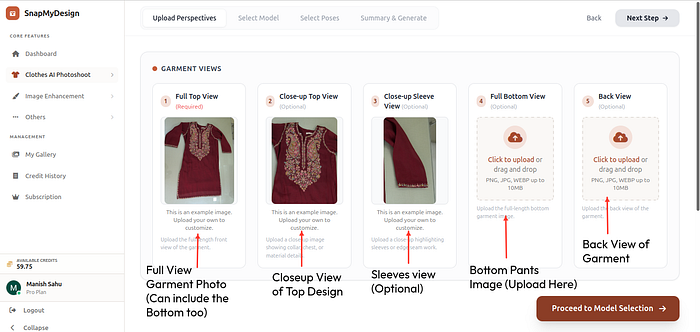
Step 1: Upload raw clothes images with different zoom levels and focus.
Upload your product photos with different angles and focus areas here: https://platform.snapmydesign.com/ecommerce-photoshoot. You can provide full-garment images, close-ups, or design-detail shots to help the AI understand your product better.
- Full Front View
- Full Back View
- Upper Body View
- 3/4 View
- Close-up Detail Shots
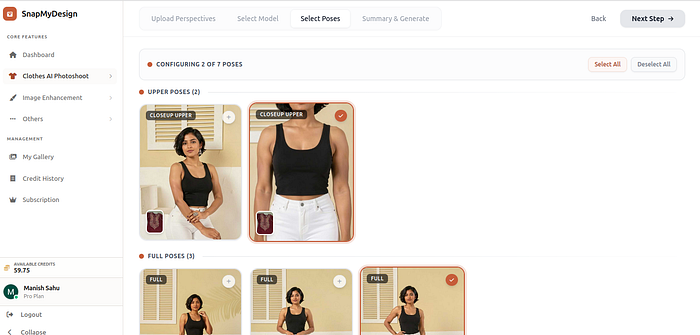
Step 2: Choose Models and Poses.
Select the model type and specific poses that fit your catalogue requirements.
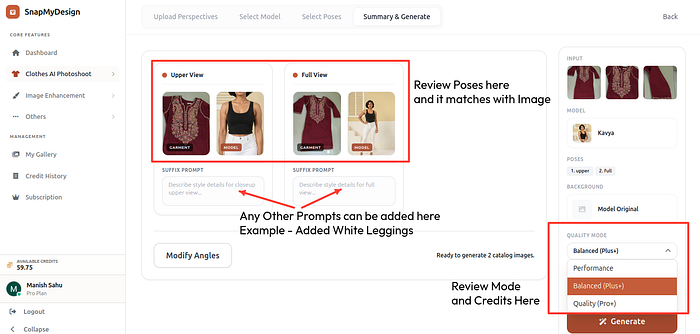
Step 3: Review the Summary Page
- Add an Additional Prompt: For example, you can add
"with white leggings"to define or complete the bottom part of the outfit. These can describe additional clothes that are not the main focus. - Choose the Quality Model:
- Performance Mode: Best for simple clothes like solid tops and solid jeans.
- Balanced Mode: Best for complex patterns and items like Indian Kurtis.
- Quality Mode: Best for difficult cases.
Step 4: Download and Upsample to 8K Generation
Review the results. If you are not satisfied, try running with the Balanced or Quality models. You can also click the HD option to generate a super-crisp image.
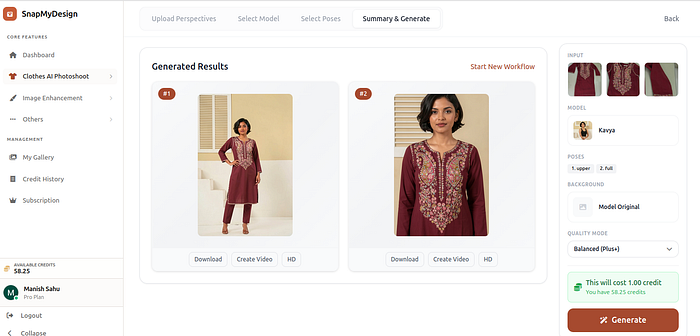
Bonus: Upsample to 8K
You can watch a video tutorial for 4K/8K Generation on YouTube: https://www.youtube.com/watch?v=6OWqXGk6-EM
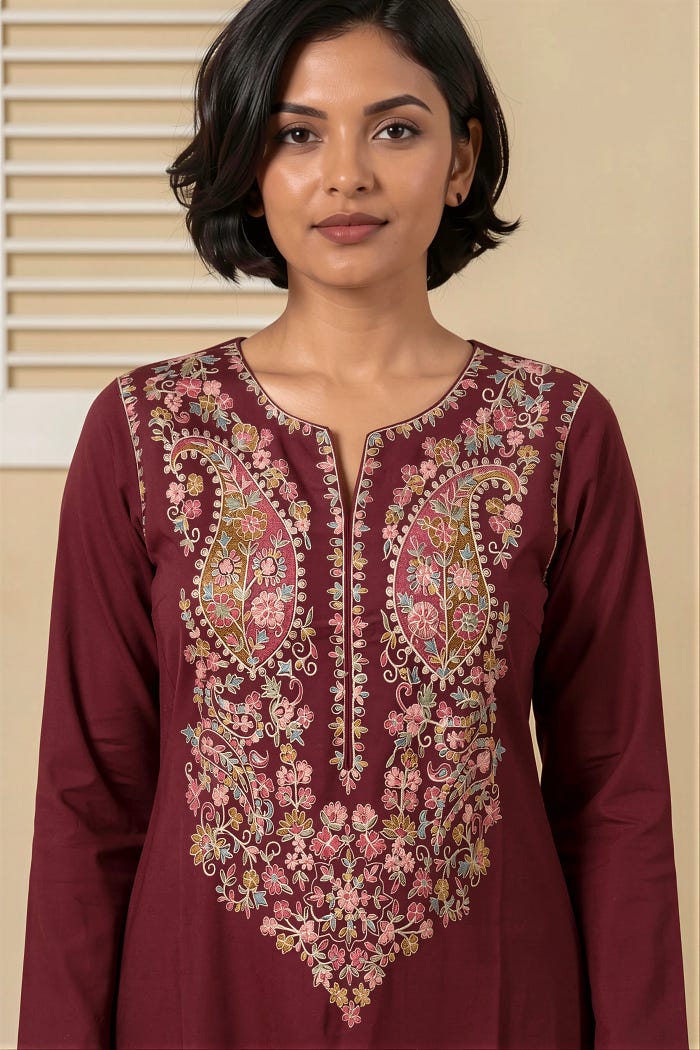
Create Multiple Catalog Images From One Product Photo
To scale your online store, you need to automate fashion catalog production. Instead of booking separate shoots for every angle, you can upload a single product photo and get a complete, high-quality ai generated catalogue in minutes. With SnapMyDesign's smart ai catalog management tools, organizing and updating your seasonal lookbooks becomes effortless, letting you deploy fresh collections to your digital shelves instantly.
Generate Fashion Catalog PDFs for WhatsApp, Shopify and Amazon
Formatting your product listings for different sales channels can be tedious. Now, you can create product catalogue using ai and instantly export them in optimized formats for platforms like WhatsApp, Shopify, and Amazon. Our advanced ai catalogue maker simplifies this process, generating high-converting, print-ready PDFs and digital files. This product catalogue ai solution ensures your layouts are uniform, professional, and tailored to the requirements of each platform.
Why Fashion Brands Are Switching to AI Photoshoots
Traditional model photography is expensive, logistically complex, and slow. By adopting modern ai fashion photography, brands can generate any style of ai model photo in seconds. High-quality ai product photography eliminates the need for studio rental, hair and makeup artists, and physical samples. This allows brands to test new designs on realistic models virtually before they even start manufacturing.
Create Complete Fashion Catalogs with AI
Instead of spending time and money on traditional photoshoots, generate professional AI fashion catalogs with multiple poses, angles, and detail shots directly from your existing product images.
This solution is perfect for:
- Fashion brands
- D2C sellers
- Boutiques
- Manufacturers
- Online marketplaces
Other Tutorials
- Outfit Extractor — https://snapmydesign.com/blogs/fashion-extractor-guide/
- Flat Lay Generation — https://snapmydesign.com/blogs/from-messy-photos-to-catalog-ready/
- 4/8K Super Resolution — https://www.youtube.com/watch?v=6OWqXGk6-EM
- Dummy to AI Model — https://snapmydesign.com/blogs/The-Ultimate-Guide-to-High-Converting-Fashion-Photography-for-Indian-E-Commerce/
- Flat Lay to AI Model — https://snapmydesign.com/blogs/From-Flatlays-to-On-Model-Shots-in-Seconds-SnapMyDesign's-Advanced-AI-Photoshoot-for-Fashion-Brands/